Cloudflare Durable Objects: Stateful Compute at the Edge
Cloudflare Workers are stateless, which is fine until your application needs to remember something. Durable Objects are the stateful primitive that fills that gap: one single-threaded instance per id, with memory and storage, that can hold WebSockets open. With diagrams and plain explanations, here is how they work, how to set one up, what they cost, and how I used one to push webhooks live to the browser in my HTTP Inspector.
1. Introduction#
Imagine a help desk where every call goes to a different person, and none of them has ever heard of you. Each time you call, you start from zero. You explain everything again, and when you hang up, they forget you existed.
That is how a Cloudflare Worker behaves by default. Each request can run on a fresh copy, on any machine, in any data center, and the Worker is not supposed to remember anything between requests. That is a good design for serving requests, and it is why Workers scale so well. It is also why they cannot do some jobs on their own.
A chat room cannot live in a function that forgets. Neither can a live dashboard, a shared document, or a game lobby. Each of those needs one place where the current state sits, one place every participant talks to, and one place that can push updates out instead of waiting to be asked. That is the job Cloudflare built Durable Objects for.
I ran into this directly while building the webhook inbox in my HTTP Inspector, live at http.avenash-kumar.com. The inbox receives webhooks from other services and shows them in the browser. Polling every few seconds worked, but I wanted new webhooks to appear the moment they arrived. That needs a live connection to the browser, and a live connection needs something stateful holding it. A Durable Object is that something.
This article explains what Durable Objects are, how they work, how to set one up, when to use them and when not to, what they cost, and then walks through the real implementation in the HTTP Inspector. It assumes you know basic JavaScript and HTTP, and nothing else about Cloudflare. Every new term is explained the first time it appears.
2. Words to know#
If you are new to Cloudflare, this box is the whole vocabulary of the article. Come back to it whenever a word looks unfamiliar.
- Worker: a small piece of JavaScript that runs on Cloudflare's network in response to a request. It has no server of its own.
- Edge / data center: Cloudflare runs your code on machines all over the world, close to the user making the request. "The edge" means that network of machines.
- Isolate: the lightweight sandbox a Worker runs in. Think of it as a tiny, fast container that starts in milliseconds.
- Stateless: remembers nothing between requests. Each request starts fresh.
- Stateful: remembers things between requests. It keeps state, which is just data that lives on after one request ends.
- Durable Object: a stateful object that lives on the Workers platform. One instance per id, with memory and storage, able to hold WebSockets open.
- Id: a short label that names one thing, like one chat room or one inbox. The id is the address of its object.
- Stub: a handle for one Durable Object instance. You call the stub, and Cloudflare routes the call to the right instance.
- WebSocket: a connection between a browser and a server that stays open, so the server can push messages to the browser at any time instead of waiting to be asked.
- Hibernation: the runtime putting an idle object to sleep. Its memory is dropped, but its WebSockets stay open and its stored data stays saved.
- SQLite / D1: SQLite is a small relational database. D1 is Cloudflare's serverless SQLite database, used here to store webhook messages.
- KV (Workers KV): a global key-value store. Fast to read from anywhere, but a write can take time to reach every location.
- Queue: a line of messages waiting to be picked up. A producer adds messages, a consumer takes them off and does the work.
- Claim check: a pattern where the full message is stored somewhere safe, and only a small note with its id is sent onward. The note is the claim, the stored message is what it claims.
- RPC: remote procedure call. Calling a method on a stub as if it were a local function, even though the object lives somewhere else.
- Alarm: a timer an object sets for itself, so the runtime wakes it up at a chosen time.
- Eventual consistency: a promise that data will agree everywhere eventually, but not necessarily right away. A read just after a write can return the old value.
3. What a Durable Object is#
A Durable Object is a stateful compute primitive on the Workers platform. "Primitive" here just means a basic building block. You define a class, and Cloudflare runs one instance of that class for each unique id you ask for. That instance is the whole point. It has an address, it has memory, and it has storage, and every request for the same id goes to the same instance.
Before that makes sense, look at the problem it solves. A Worker forgets everything between requests:
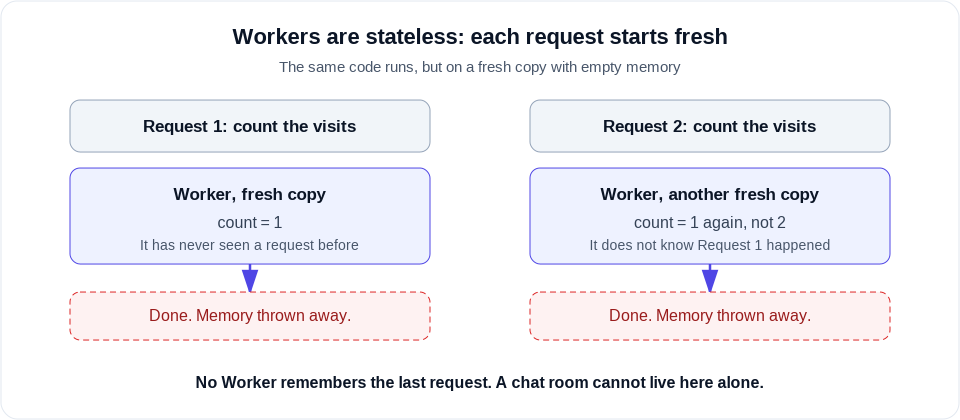
Figure 1: Workers are stateless. Each request starts on a fresh copy with empty memory.
Three properties define a Durable Object.
One instance per id. You address an object by id, and there is exactly one live instance of that id in the world. If two requests ask for the same id, they both reach the same instance. If they ask for different ids, they reach different instances, which can run in parallel on different machines.
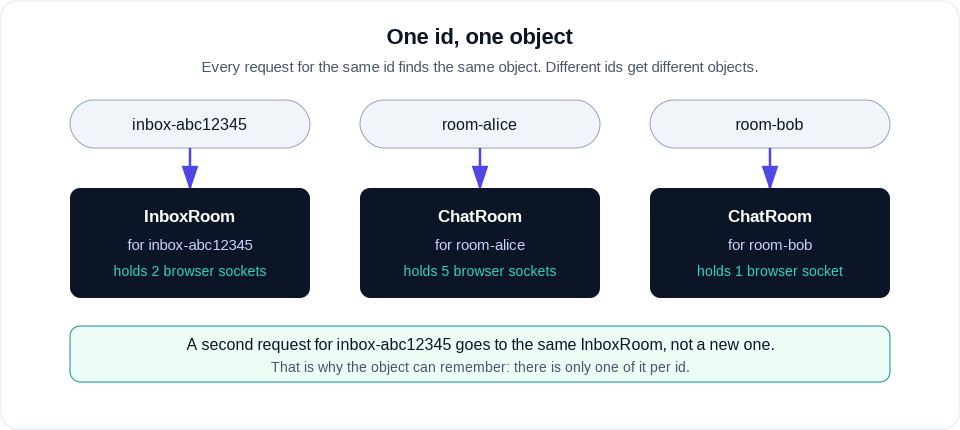
Figure 2: One id, one object. A second request for the same id goes to the same object, not a new one.
Single-threaded. An instance processes one event at a time. Two requests to the same instance never run at the same moment, they queue up and run in order. That sounds like a limitation, and it is one, but it is also the feature that makes in-memory state safe. You can keep a counter, a set of WebSockets, or a small map in a plain variable, and you never need a lock, because nothing else runs while your code runs. A lock, for readers who have not met one, is a mechanism that stops two pieces of code from changing the same data at the same time. Here you never need one, because two pieces of code never run at the same time inside one object.
Memory plus durable storage. The instance can keep things in memory, and it can also persist things to storage that survives restarts. "Persist" means save in a way that lasts. If the instance is evicted from memory, or the data center restarts it, the stored data is still there when the next request wakes it up. Memory is fast and temporary, storage is slower and permanent, and a real application uses both.
3.1. How that differs from a Worker, KV, and D1#
It helps to place Durable Objects next to the three things people usually reach for first. The table is the short version, and the paragraphs below it explain each row.
| Tool | What it is | Remembers? | Runs your code? | Can push to a browser? |
|---|---|---|---|---|
| Worker | Stateless compute | No | Yes | No, not across requests |
| Workers KV | Global key-value storage | Yes, eventually consistent | No | No |
| D1 | Serverless SQLite database | Yes | No | No |
| Durable Object | Stateful compute plus storage, one per id | Yes | Yes | Yes, over WebSockets |
A Worker is stateless compute. It runs your code in response to a request and then forgets. It is the right tool for transforming requests, serving APIs, and doing anything that does not need to remember the previous request. It cannot hold a WebSocket open across requests, and it cannot keep shared state in memory, because the next request may run somewhere else entirely.
Workers KV is storage, not compute. It is a global key-value store with fast reads from everywhere, but writes take time to propagate, so a read right after a write can return the old value. That is called eventual consistency. KV is good for configuration, cached content, and data that rarely changes. It cannot run your code, it cannot coordinate between writers, and it cannot push anything to a browser.
D1 is Cloudflare's serverless SQLite database. It is good for structured, relational data that many readers need: tables, indexes, and queries. Writes go to one primary location and reads can be served from near the reader. D1 is storage with a query language. Like KV, it does not run your code, it does not hold connections open, and it cannot push.
A Durable Object is the fourth piece: compute plus storage plus identity, in one place. It runs your code, it remembers, and it can be addressed. If you need a single coordinator for a piece of state, that is the tool.
4. How Durable Objects work#
4.1. Getting a stub#
Your Worker never talks to a Durable Object class directly. It talks to a stub, which is a handle for one specific instance. Think of the id as a street address and the stub as the phone number for the house at that address. You get the id first, then the stub.
There are three ways to get an id. idFromName takes a string, like a room name or an inbox id, and always returns the same id for the same string. idFromString parses an id you stored earlier as a hex string. newUniqueId generates a fresh id nobody has used before. In the HTTP Inspector, each inbox already has a short id, so idFromName is the natural fit: the id for an inbox is always the same object. Here is the line from the Worker's WebSocket route, where id is the inbox id taken from the URL:
const stub = env.INBOX_DO.get(env.INBOX_DO.idFromName(id));
env.INBOX_DO is the binding, the name your Worker uses to reach the Durable Object class. idFromName(id) turns the inbox id into a Durable Object id. .get(...) returns the stub for that id.
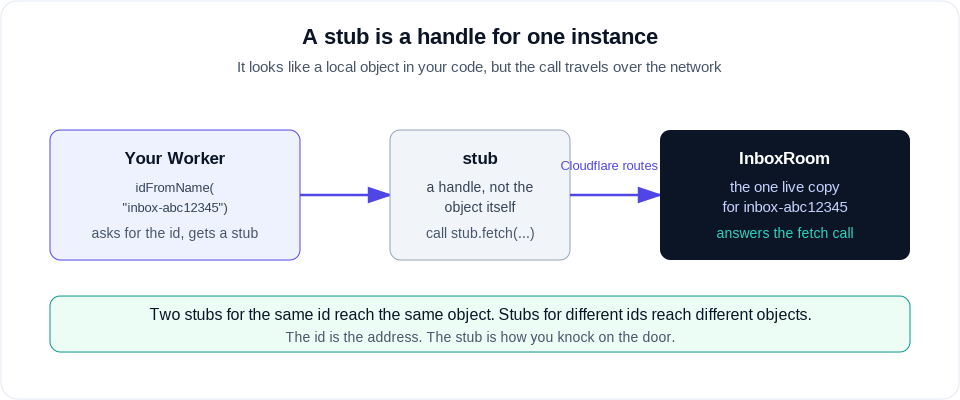
Figure 3: A stub is a handle. It looks like a local object in your code, but the call travels over the network to the one live instance for that id.
Once you have the stub, you call it. The two common ways are fetch and RPC, covered below. The stub looks like a local object, but the call goes over the network to wherever the instance lives. Cloudflare picks one location for the instance, and every request for that id is routed there.
4.2. The fetch handler#
The simplest way to talk to an object is HTTP. The stub has a fetch method, and the class has a fetch method to answer it. The Worker's WebSocket route forwards the browser's upgrade request to the object with a single call:
return stub.fetch(new Request("http://do/ws", request));
Inside the class, fetch is an ordinary handler. It can read the URL, check the method, do work, and return a Response. This is the pattern the HTTP Inspector uses: the queue consumer sends a POST to /push, and the object broadcasts to its sockets. Using plain HTTP between the Worker and the object keeps the boundary simple, and it means you can test the object with curl-like requests if you need to. The URL http://do/ws is not a real website. It is just a label the object reads to decide which branch of its fetch method to run.
4.3. WebSockets and hibernation#
WebSockets are where Durable Objects earn their keep. A browser opens a WebSocket to your Worker, the Worker hands the connection to the object, and the object keeps it. The hibernation API is the set of methods that makes this work:
const pair = new WebSocketPair();
const [client, server] = Object.values(pair);
this.state.acceptWebSocket(server);
return new Response(null, { status: 101, webSocket: client });
Read it line by line. new WebSocketPair() creates two ends of one connection, like two ends of a phone call. One end, client, goes back to the browser. The other end, server, stays with the object. acceptWebSocket(server) attaches the server end to the object, so the object owns it from then on. Returning a 101 response with the client end completes the upgrade, which is the handshake that turns an HTTP request into a WebSocket connection.
acceptWebSocket attaches the server side of the socket to the object. getWebSockets returns all attached sockets, so a broadcast is a loop over that list. The class also implements three handlers: webSocketMessage runs when a socket sends a message, webSocketClose runs when one closes, and webSocketError runs when one breaks. In the inbox, the browser never sends messages, so all three are empty, but they must exist for the hibernation API to work.
Hibernation is the part that makes this cheap. When nothing is happening, the runtime puts the object to sleep. Its in-memory state is dropped, but its attached WebSockets stay open, and its stored data stays in storage. When a message arrives on a socket, or a request comes in, the runtime wakes the object up and calls the right handler. You do not pay for an idle object the way you would pay for an idle server holding connections open. The sockets are the durable part, the compute wakes up only when there is work.
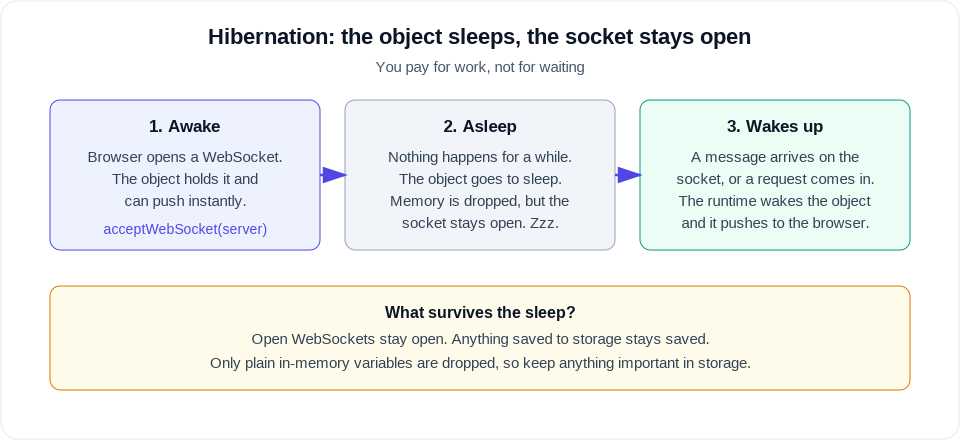
Figure 4: Hibernation. The object sleeps when idle, but the socket stays open, and a message wakes it up.
One warning from that diagram is worth repeating in words: only plain in-memory variables are dropped when the object sleeps. If something must survive, save it to storage. In the inbox this is not a problem, because the messages live in D1 and the object only holds sockets.
4.4. Storage#
Every object has storage, reached through this.state.storage. The recommended backend is SQLite, which gives the object a real relational database: tables, indexes, and queries, inside the object itself. SQLite-backed objects are also the only kind available on the free plan, which is one more reason to use them for anything new.
Storage is separate from memory. Memory is a plain variable in your class, fast and gone when the object sleeps. Storage survives. The usual shape is to keep hot state, like the set of connected sockets or a small cache, in memory, and to keep anything that must survive a restart in storage. The inbox object in the HTTP Inspector actually stores nothing at all: the messages live in D1, and the object only holds sockets. That is a valid design too. An object does not have to use its storage to be useful.
4.5. Alarms#
An object can schedule work for later with an alarm. You call storage.setAlarm with a time, and when that time comes, the runtime wakes the object and calls its alarm method. Alarms are useful for timeouts, cleanup, retries, and anything that should happen once at a known time. A chat room could use an alarm to close an idle room, or a game lobby could use one to start a match after a countdown. Alarms are per object, so each room manages its own schedule.
4.6. RPC#
Fetch is not the only way to call an object. You can also call methods on the stub directly, which Cloudflare calls RPC. Instead of building a Request and parsing a Response, you define a method on the class and call it like a function from the Worker. Fetch is simpler when the caller and the object only need to exchange JSON, and RPC is nicer when the object has a real API with several methods. Both go to the same single instance, and both are serialized the same way. "Serialized" means the calls are lined up and run one at a time, which is the single-threaded guarantee from earlier.
5. Setting one up, step by step#
There are four pieces: the binding, the migration, the class, and the call from the Worker. Here they are, using the real configuration from the HTTP Inspector.
Step 1: the binding in wrangler.toml. wrangler.toml is the configuration file for a Worker project, and Wrangler is the command line tool that deploys it. The binding tells Wrangler that your Worker may talk to a Durable Object class, and what name it will use in code:
[[durable_objects.bindings]]
name = "INBOX_DO"
class_name = "InboxRoom"
name is the name your code uses, env.INBOX_DO. class_name is the class in your code, InboxRoom.
Step 2: the migration. A migration is a versioned instruction that creates the class in your account. New classes use the SQLite backend:
[[migrations]]
tag = "v1"
new_sqlite_classes = ["InboxRoom"]
The tag is a version label for the migration. If you add another class later, you add another migration with a new tag. Wrangler applies migrations when you deploy.
Step 3: the class. The class is exported from your Worker entry point, and its constructor receives the object state. The minimum useful class has a fetch method:
export class InboxRoom {
  private state: DurableObjectState;

  constructor(state: DurableObjectState, _env: Env) {
    this.state = state;
  }

  async fetch(request: Request): Promise<Response> {
    // handle the request, return a Response
  }
}
DurableObjectState is the object Cloudflare hands your class. It is how the class reaches its storage and its WebSockets, through this.state.storage and this.state.acceptWebSocket.
Step 4: calling it from the Worker. Declare the binding in your Env type, then get a stub and call it. Env is the TypeScript type that describes everything your Worker can reach: databases, queues, and object bindings.
export interface Env {
  DB: D1Database;
  ASSETS: Fetcher;
  BASE_URL: string;
  WEBHOOK_QUEUE: Queue<WebhookQueueMessage>;
  INBOX_DO: DurableObjectNamespace;
}
const stub = env.INBOX_DO.get(env.INBOX_DO.idFromName(id));
return stub.fetch(new Request("http://do/ws", request));
That is the whole setup. The class lives in the same file and the same deployment as the Worker, and the binding is what connects them.
6. When to use them, and when not to#
Durable Objects fit when the unit of work is one thing that many clients share, and that thing needs a single coordinator.
Chat rooms and live collaboration. One room, one object. Every participant connects to the same instance, which holds the sockets and the current state. A message from one participant goes to the object, and the object sends it to the rest. This is the textbook case.
Live updates and dashboards. A page that should refresh the moment something changes, instead of polling. The object holds the watching browsers and pushes when new data arrives. This is what the HTTP Inspector does, and it is covered in detail below.
Game lobbies and multiplayer sessions. One lobby, one object, holding the players and the game state. The single-threaded execution is a real advantage here: two players cannot move at the same instant, so the state can never be half updated.
Per-user or per-room state. Anything naturally keyed by one id: a user session, a document, a device, a shopping cart that is being edited live. One id, one object, and all reads and writes for that id go through it.
They do not fit everywhere, and using one where a simpler tool works only adds moving parts.
Plain request and response APIs. If a request can be answered from a database and forgotten, a Worker plus D1 is simpler, cheaper, and faster. An object adds a network hop to a single location, which is the wrong trade for a global read-heavy API.
Heavy write contention on one id. "Contention" means many writers fighting over the same thing. Single-threaded execution is also a bottleneck. If thousands of clients hammer the same object at once, their requests queue up behind each other. A global counter that every visitor increments is a bad fit. Shard it across many ids, or use a database. "Shard" means split the work across many pieces, so each piece handles only part of the load.
Large relational datasets. If the data is big, needs complex queries, or is shared across many unrelated readers, D1 is the better store. An object's storage is for the state of that one object, not for a warehouse.
Simple caching. If you just need a value available everywhere with fast reads, KV is the tool. An object is compute, not a cache.
6.1. Against polling, Queues, and D1#
Polling is the simplest live update mechanism: the browser asks "anything new?" every few seconds. It needs nothing new on the server, and it is what the inbox used first. Its costs are delay and waste. New data waits up to one poll interval, and most polls return nothing. A Durable Object with a WebSocket removes the delay and the waste, at the cost of one more moving part.
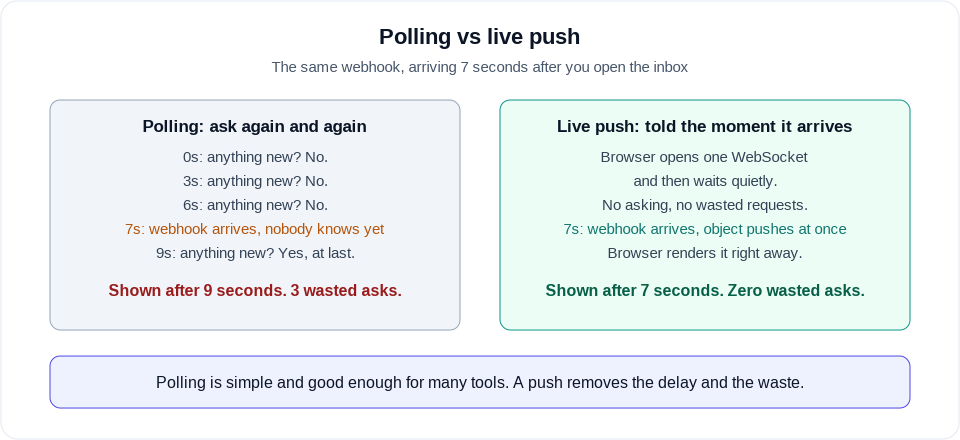
Figure 5: Polling vs live push. Polling is simple and good enough for many tools. A push removes the delay and the waste.
Queues are for asynchronous work, not for pushing to browsers. "Asynchronous" means work that happens in the background, not while the requester waits. A queue holds a message until a consumer picks it up, which is good for retries and absorbing bursts, but a browser cannot consume a queue. Cloudflare Queues only talk to Workers. There is no browser SDK and no URL a browser can subscribe to. In the inbox design below, the queue and the object do different jobs: the queue carries the notification reliably, and the object delivers it live.
D1 is storage. It can hold the messages, and the browser can read them, but D1 cannot tell the browser that a new row exists. Something has to notice the write and push. In the design below, that something is the queue consumer plus the Durable Object.
7. Pricing and the free tier#
The numbers below are from the Cloudflare Durable Objects pricing docs, checked on 2026-11-27. Cloudflare changes pricing pages, so check the docs before budgeting anything serious, but as of that date the free tier is generous for a personal project.
On the Workers Free plan:
- 100,000 Durable Object requests per day. A request here includes HTTP requests to the object, RPC sessions, WebSocket messages, and alarm invocations, so every push to a browser counts against it.
- 13,000 GB-seconds of duration per day. Duration is wall-clock time while the object is actively running, or idle in memory but unable to hibernate. A GB-second is one gigabyte of memory used for one second. An object that hibernates while its sockets sit idle does not burn duration, which is why the hibernation API matters for cost as well as for scale.
- 5 million SQLite rows read per day, and 100,000 rows written per day.
- 5 GB of SQLite storage in total.
- Only SQLite-backed objects are available on the free plan.
Two properties of the free tier are worth knowing. First, the limits are per day and reset at 00:00 UTC. Second, if you exceed a free limit, the operation fails with an error. There are no overage charges on the free plan, so a runaway object cannot surprise you with a bill. It just stops working until the limit resets.
On the Workers Paid plan, which is 5 dollars a month, 1 million requests a month are included, then 0.15 dollars per million after that.
For the webhook inbox, the free tier is far more than enough. One object per inbox, holding one WebSocket, uses a tiny fraction of 100,000 requests a day. The free tier would only become a problem with thousands of inboxes open at once, all day, every day.
8. A real example: live webhooks in the HTTP Inspector#
The HTTP Inspector is my tool for checking URLs and testing webhooks, at http.avenash-kumar.com. The webhook inbox gives you an endpoint like https://http.avenash-kumar.com/hook/abc12345, and any service can POST webhooks to it. You open the inbox in the browser and watch the requests arrive. The code is in the AvenashKumar/http-inspector repo, and this feature landed there on 2026-11-27. At the time of writing, the code is on main and the live deploy is a manual wrangler deploy away.
The inbox already stored messages in D1, and the browser polled for new ones every 3 seconds. That worked, but a webhook could sit for up to 3 seconds before it appeared, and the page spent most of its polls asking about nothing. The goal was simple: new webhooks should appear the moment they arrive.
8.1. The design: claim check, queue, object, socket#
The flow has four steps, and each piece does one job.
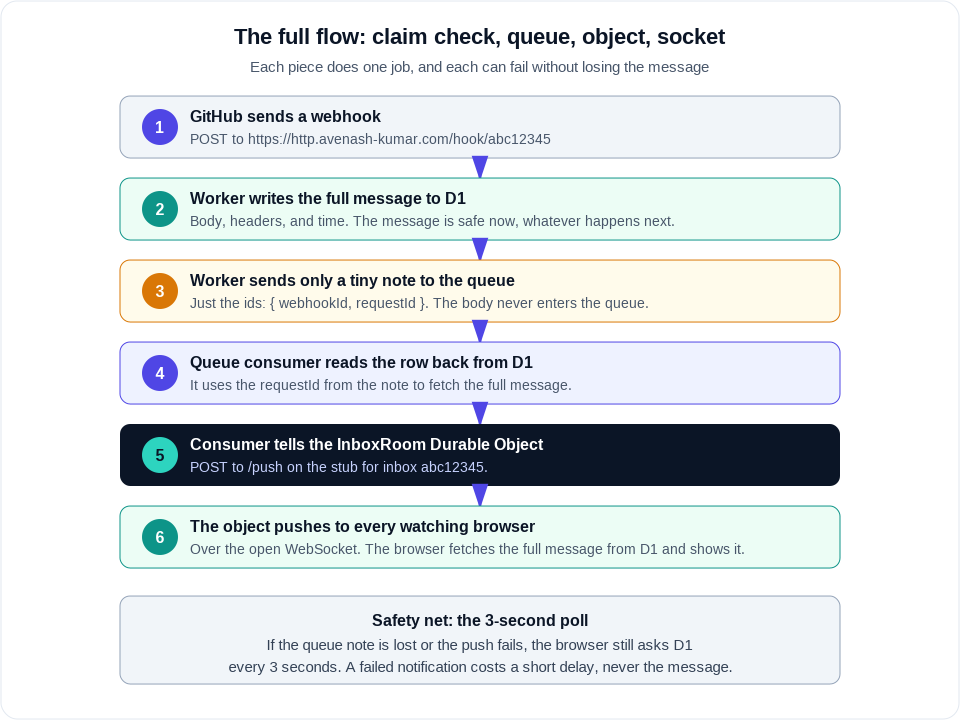
Figure 6: The full flow. Each piece does one job, and each can fail without losing the message.
Step 1: the webhook arrives and is stored. A POST to /hook/:id writes the full message to D1 first, before anything else happens. The body is capped at 200 KB, set by this line in the Worker:
const MAX_BODY = 200 * 1024;
The handler inserts the row, then sends only the ids through the queue:
// Claim check: the full message is already safe in D1, so the queue only
// carries the ids. If the queue send fails, the webhook is still stored.
try {
  await env.WEBHOOK_QUEUE.send({ webhookId: id, requestId });
} catch (e) {
  console.error("webhook queue send failed", e);
}
This is the claim-check pattern. The full message stays in D1, and the queue carries only a small notification, the webhook id and the request id. That neatly solves the one hard limit of putting the message in the queue: a queue message cannot be larger than 128 KB, but webhook bodies can be up to 200 KB. The queue never sees the body, so the cap never matters. It also means that if the queue send fails, nothing is lost, because the message is already safe in D1.
Step 2: the consumer reads the row from D1. A queue consumer in the same Worker receives the notification, reads the full row back from D1, and tells the Durable Object for that inbox to push:
async function handleQueue(batch: MessageBatch<WebhookQueueMessage>, env: Env): Promise<void> {
  for (const msg of batch.messages) {
    try {
      const { webhookId, requestId } = msg.body;
      const row = await env.DB.prepare("SELECT * FROM webhook_requests WHERE id = ?").bind(requestId).first();
      if (!row) {
        msg.ack();
        continue;
      }
      const stub = env.INBOX_DO.get(env.INBOX_DO.idFromName(webhookId));
      const res = await stub.fetch(
        new Request("http://do/push", {
          method: "POST",
          headers: { "content-type": "application/json" },
          body: JSON.stringify({ type: "webhook", webhookId, requestId }),
        }),
      );
      if (!res.ok) throw new Error(`inbox push failed with status ${res.status}`);
      msg.ack();
    } catch (e) {
      console.error("webhook queue message failed, retrying", e);
      msg.retry();
    }
  }
}
Note the order. The row is read first, so the consumer confirms the message exists before pushing. If the row is gone, the message is acknowledged and skipped. ack means "I handled this, do not send it again." If the push fails, the message is retried, and the queue delivers it again. retry means "I did not handle this, send it again later." The queue also gives the design a retry mechanism the direct call would not have.
Step 3: the object pushes to the browsers. The InboxRoom class is one room per inbox. It holds the WebSockets of every browser watching that inbox, and its /push endpoint broadcasts to all of them:
// One room per inbox. It holds the browsers watching that inbox and pushes
// a note to them whenever a new webhook arrives. It stores nothing itself;
// the messages live in D1.
export class InboxRoom {
  private state: DurableObjectState;

  constructor(state: DurableObjectState, _env: Env) {
    this.state = state;
  }

  async fetch(request: Request): Promise<Response> {
    const url = new URL(request.url);
    if (url.pathname === "/ws") {
      if (request.headers.get("Upgrade") !== "websocket") {
        return new Response("Expected a WebSocket upgrade.", { status: 426 });
      }
      const pair = new WebSocketPair();
      const [client, server] = Object.values(pair);
      this.state.acceptWebSocket(server);
      return new Response(null, { status: 101, webSocket: client });
    }
    if (url.pathname === "/push" && request.method === "POST") {
      const body = await request.text();
      let sent = 0;
      for (const ws of this.state.getWebSockets()) {
        try {
          ws.send(body);
          sent++;
        } catch {
          // The socket is gone; skip it.
        }
      }
      return json({ ok: true, sent });
    }
    return new Response("Not found", { status: 404 });
  }

  async webSocketMessage(_ws: WebSocket, _message: string | ArrayBuffer): Promise<void> {}
  async webSocketClose(_ws: WebSocket, _code: number, _reason: string, _wasClean: boolean): Promise<void> {}
  async webSocketError(_ws: WebSocket, _error: unknown): Promise<void> {}
}
The object stores nothing. The messages live in D1, and the object is only the delivery mechanism. That separation is deliberate: D1 is the durable record, the queue is the reliable notification, and the object is the live push. Each piece can fail without taking the others down. If the object is asleep or unreachable, the message is still in D1, and the browser will see it on its next poll.
Step 4: the browser opens a socket and renders. The Worker routes WebSocket upgrades for an inbox to its room, after checking the inbox exists:
if (path.startsWith("/ws/inbox/")) {
  const id = path.slice("/ws/inbox/".length).split("/")[0];
  if (!id) return json({ error: "Inbox id is required" }, 400);
  if (request.headers.get("Upgrade") !== "websocket") {
    return json({ error: "Expected a WebSocket upgrade." }, 426);
  }
  const hook = await env.DB.prepare("SELECT id FROM webhooks WHERE id = ?").bind(id).first();
  if (!hook) return json({ error: "Webhook inbox not found" }, 404);
  const stub = env.INBOX_DO.get(env.INBOX_DO.idFromName(id));
  return stub.fetch(new Request("http://do/ws", request));
}
And the browser connects when an inbox opens, refreshes its list on every push, and reconnects on its own if the socket drops:
function connectHookSocket() {
  if (!inboxId) return;
  hookSocketWanted = true;
  if (hookSocketRetryTimer) { clearTimeout(hookSocketRetryTimer); hookSocketRetryTimer = null; }
  if (hookSocket) { try { hookSocket.close(); } catch (e) {} hookSocket = null; }
  let ws;
  try {
    ws = new WebSocket(location.origin.replace(/^http/, "ws") + "/ws/inbox/" + encodeURIComponent(inboxId));
  } catch (e) {
    scheduleHookSocketRetry();
    return;
  }
  hookSocket = ws;
  ws.addEventListener("open", () => { updateHookLive(); });
  ws.addEventListener("message", () => { refreshHooks(); });
  ws.addEventListener("close", () => {
    if (hookSocket === ws) hookSocket = null;
    updateHookLive();
    if (hookSocketWanted && inboxId) scheduleHookSocketRetry();
  });
  ws.addEventListener("error", () => { try { ws.close(); } catch (e) {} });
}
The live indicator in the page reflects whichever channel is up. When the socket is connected it reads "Live: connected, new requests appear instantly.", and when only the poll is running it reads "Live: checking for new requests every 3 seconds." The poll stays as a fallback, so a failed push is never the only path to seeing a message.
8.2. The wrangler.toml for the whole thing#
The full configuration that ties it together is short. The queue is named http-inspector-webhooks, the binding is INBOX_DO, and the class is InboxRoom:
[[queues.producers]]
binding = "WEBHOOK_QUEUE"
queue = "http-inspector-webhooks"

[[queues.consumers]]
queue = "http-inspector-webhooks"
max_batch_size = 10

[[durable_objects.bindings]]
name = "INBOX_DO"
class_name = "InboxRoom"

[[migrations]]
tag = "v1"
new_sqlite_classes = ["InboxRoom"]
The queue itself was created once in the Cloudflare dashboard with that exact name. There is no dead-letter queue in this design, deliberately. A dead-letter queue holds failed messages for inspection and replay, which matters when the message is the work. Here the message is only a notification, and the real work already happened in D1, so a failed notification costs at most a 3 second poll delay. If the consumer later gets a job where loss matters, like forwarding webhooks to another URL, that is when a dead-letter queue earns its place.
8.3. How I verified it#
Before pushing, I ran the whole flow locally with wrangler dev, which simulates Queues, Durable Objects, and D1 on your machine. A test script created an inbox, opened a WebSocket to it, posted a webhook, and waited for the push. The push arrived through the socket, the row was in D1, a simulated webhook pushed too, and a WebSocket to a fake inbox id was rejected. The typecheck was clean. That local run is what gave me enough confidence to push the three changed files, src/index.ts, wrangler.toml, and public/app.js, to the repo.
9. Closing#
Durable Objects are a small idea with a large reach. A Worker handles a request and forgets it. A Durable Object is the one place that remembers, one instance per id, single-threaded, with memory and storage, able to hold a WebSocket open while it sleeps. That combination is what turns the edge from a request handler into a place where live applications can live.
If you have a feature that needs one coordinator, one room, one live connection, start with an object. Keep the durable record in D1, use a queue when you need reliable delivery with retries, and let the object do the one thing only it can do: push to the browsers watching right now.
The code for the webhook inbox is in the AvenashKumar/http-inspector repo on GitHub, and the tool itself is at http.avenash-kumar.com. If you build something with Durable Objects, the free tier is enough to start, and the only thing it costs to try is an afternoon.

Principal Engineer, Payments & Fraud Platforms, in New York, USA. I write about the systems I run: fraud decisioning, payment platforms, edge security, and production AI.