
Java 25: the new LTS, explained for everyone
Java 25 is the new long-term support release. Here is what it actually changes, with code you can run, explained so a junior developer or a student can follow along.
Java 25 is the new long-term support release. It came out on September 16, 2025, and it is the version I would pick for a new project today. This post explains what it actually changes, with code you can run, in plain language. If you are a junior developer or a student, this is written for you. If you are experienced, the code samples and the trade-offs are still worth your time.
What "LTS" means, and why it matters
Java ships a new version every six months. Most of those versions get only six months of support, and then you are expected to move on. Every two years, one version is marked Long-Term Support, or LTS. An LTS version gets years of security fixes and updates. Java 25 is the current LTS. Oracle gives it Premier Support until September 2030. The previous LTS was Java 21, from September 2023. The next LTS will be Java 29, expected in September 2027.
That is why Java 25 matters more than the versions around it. Java 26 (March 2026) and Java 27 (September 2026) are short-term releases. Teams that run production systems pick an LTS and stay on it. If you are learning Java now, or you are planning an upgrade from Java 21, Java 25 is the target.
Java 25 writes class files with major version 69. That only matters when you mix old and new tooling, but it is the kind of detail that saves you an hour of confusion when a build fails.
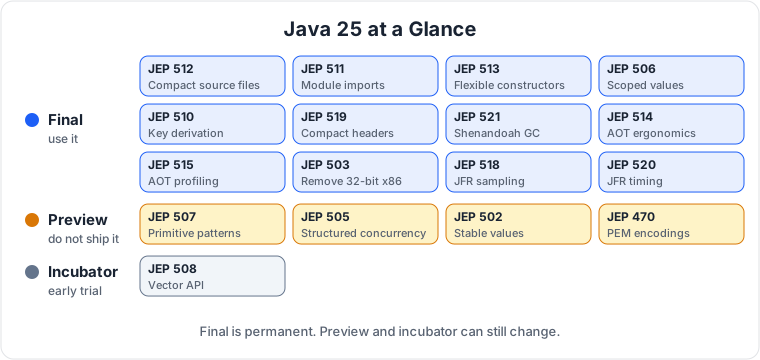
Java marks new features in three ways. A final feature is permanent and safe to use in production. A preview feature is real and runnable, but it can still change, so do not build production code on it. An incubator feature is even earlier and may change a lot or disappear. I will label every preview and incubator feature clearly. When I say a feature is final in Java 25, I mean it is safe to use.
The big picture
Java 25 does not have one headline feature like records (Java 16) or virtual threads (Java 21). That is the point. Java 25 is the release where several features that were previewed during the Java 21 to 24 cycle finally become permanent. The theme is not a new idea. The theme is that the platform grows up.
If you are coming from Java 21, you are not learning a new language. You are picking up a set of small improvements that make everyday code shorter, safer, and cheaper to run.
Compact source files and instance main methods (JEP 512)
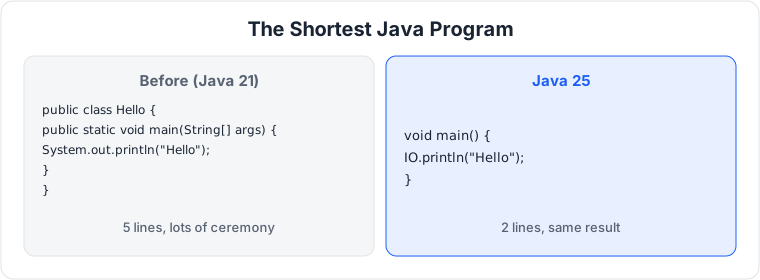
This is the most visible change in Java 25, and the easiest to understand. It answers a question every beginner asks: why do I need all that ceremony just to print one line?
Before Java 25, the smallest Java program looked like this.
public class Hello {
    public static void main(String[] args) {
        System.out.println("Hello, Java 25");
    }
}
You need a class, a public static method, a String array parameter, and a long print call. None of that has anything to do with printing a line. It is boilerplate, which is a word for code you must write even though it adds no meaning.
Java 25 lets you write this instead.
void main() {
    IO.println("Hello, Java 25");
}
That is the whole program. Save it as Hello.java and run it with java Hello.java. Three things make this work. A compact source file has no class declaration; Java still compiles it to a class behind the scenes, and it implicitly imports the whole java.base module, so you do not need import statements. An instance main method no longer has to be public static and no longer has to take a String[] argument. A plain void main() is enough. And a new class, java.lang.IO, gives you println, print, and readln as simple methods. Here is a small interactive program.
void main() {
    String name = IO.readln("Your name: ");
    IO.println("Hello, " + name);
    IO.println("Welcome to Java 25.");
}
IO.readln prints the prompt and reads a line of input. IO.println prints a line. That is all there is to it.
Think of it like a recipe card. The old way was a full cookbook with a title page and a table of contents, just to write down how to make toast. The new way is the recipe card itself. The toast is the same. The ceremony is gone.
When to use it: small programs, examples, scripts, tests, and teaching. When you are trying out an idea, or showing a student how a loop works, this is the form to use.
What to watch out for: this is for small programs. A real application still needs classes, packages, and structure. Do not write a whole service in one compact source file. The feature removes ceremony, not design. And the old form still works. Nothing you already wrote breaks.
Module import declarations (JEP 511)
Java has modules, which are groups of related packages. The module java.base is the biggest one. It contains the packages you use every day: java.lang, java.util, java.io, java.net, and more.
Before Java 25, if you wanted List and Map from java.util, and Path from java.nio.file, you imported each one by name.
import java.util.List;
import java.util.Map;
import java.nio.file.Path;
That is fine for a large file, but it is tedious for a small one. Java 25 lets you import a whole module in one line.
import module java.base;

public class ModuleImportDemo {
    public static void main(String[] args) {
        List<String> names = List.of("Asha", "Ben", "Cleo");
        Map<String, Integer> scores = Map.of("Asha", 90, "Ben", 85);
        IO.println(names);
        IO.println(scores);
    }
}
import module java.base; imports every package that the module exports. List and Map come from java.util, which is part of java.base, so they are available with no further imports. IO comes from java.lang, which is also part of java.base.
Think of it like a toolbox. The old way was taking out one tool at a time and naming each one. The new way is opening the whole toolbox and saying you will use whatever is inside. For a small program, that is much shorter.
When to use it: small programs, scripts, and examples, especially together with compact source files. It pairs naturally with the feature above.
What to watch out for: if two modules export a type with the same simple name, the compiler cannot guess which one you mean, and it will report an ambiguity. Add a single-type import for the one you want, which wins over the module import. In practice, this is rare, because java.base is the module you will import most, and it does not collide with your own code.
Flexible constructor bodies (JEP 513)
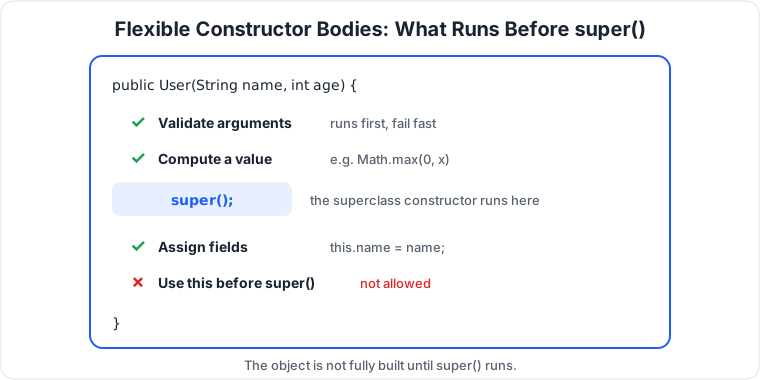
A constructor is the method that runs when you create an object. Before Java 25, a constructor had one strict rule: the first thing it had to do was call the superclass constructor with super(...), or another constructor with this(...). You could not run any of your own code first.
That rule caused a real problem. Suppose you want to check that an argument is valid before you create the object. You could not. The superclass constructor ran first, and your check ran after, so a bad argument left you with a half-built object.
Java 25 relaxes the rule. You can now run statements before super(...), as long as those statements do not use this. You can validate arguments and compute values first, and then call the superclass constructor.
public class User {
    private final String name;
    private final int age;

    public User(String name, int age) {
        if (name == null || name.isBlank()) {
            throw new IllegalArgumentException(
                "name must not be blank");
        }
        if (age < 0) {
            throw new IllegalArgumentException(
                "age must not be negative");
        }
        super();
        this.name = name;
        this.age = age;
    }
}
The checks run before super(). If the name is blank or the age is negative, the constructor throws immediately, and no half-built object exists. That is called fail-fast, which means a bad input fails right away, at the point where the mistake is made, instead of later when it is harder to find. You can also compute a value before super(), for example cleaning up a coordinate with Math.max(0, x) before the object is built.
Think of it like checking your ID before you enter a building. Before, you had to walk in first and then show your ID at the desk. Now you can show your ID at the door, and if it is not valid, you never go inside.
When to use it: any time you validate constructor arguments, or you need to compute a value that the superclass constructor needs. It is especially useful when a superclass constructor calls a method that your subclass overrides, because now you can set up your fields before that happens.
What to watch out for: you still cannot use this before super(), except to assign a field. You cannot call a method on the object, and you cannot read a field, before the superclass constructor runs. The object does not fully exist yet. If you try to use this too early, the compiler will stop you.
Scoped values (JEP 506)
This is the most important feature in Java 25 for anyone who writes server code. It is the second half of Project Loom, the project that gave us virtual threads in Java 21. Virtual threads made it cheap to have a thread per request. Scoped values make it safe to pass data along with that request.
The problem is simple. A web request comes in, and you need to carry some information with it through many method calls: the current user, a request ID, a tenant, a deadline. You do not want to add that information as a parameter to every method, so you need a way to make the data available to any code that runs while handling the request, without passing it around.
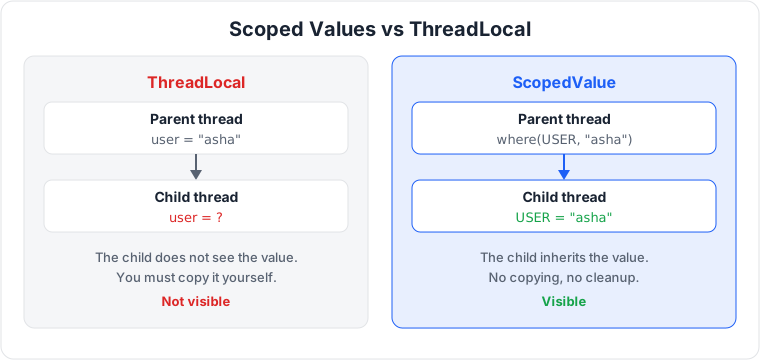
The old answer was ThreadLocal, a variable that each thread has its own copy of. It works, but it has three problems. You must remember to clean it up, or the value leaks into the next request that reuses the thread. It is mutable, so any code can change it. And it does not work well with virtual threads, because a child thread does not see the parent's ThreadLocal unless you copy it yourself.
A scoped value fixes all three. It is immutable, so no code can change it after it is bound. It is automatically cleaned up when the scope ends, so there is nothing to forget. And it is inherited by child threads, so a virtual thread you start inside the scope sees the same value.
Here is the basic pattern.
public class ScopedDemo {
    private static final ScopedValue<String> USER =
        ScopedValue.newInstance();

    public static void main(String[] args) {
        ScopedValue.where(USER, "asha").run(() -> {
            greet();
        });
        IO.println("Outside: " + USER.orElse("nobody"));
    }

    static void greet() {
        IO.println("Hello, " + USER.get());
    }
}
ScopedValue.newInstance() creates a scoped value, which is like an empty slot. ScopedValue.where(USER, "asha") binds the value "asha" to that slot. .run(...) runs the code with the binding in place. Inside the lambda, USER.get() returns "asha". Outside the lambda, the binding is gone, so USER.orElse("nobody") returns "nobody". In Java 25, orElse no longer accepts null, so you must pass a real default.
The key part is that the binding is inherited by child threads. If you start a virtual thread inside the scope, it sees the same value.
ScopedValue.where(USER, "asha").run(() -> {
    Thread child = Thread.ofVirtual().start(
        () -> IO.println("Child sees: " + USER.get()));
    try {
        child.join();
    } catch (InterruptedException e) {
        Thread.currentThread().interrupt();
    }
});
The child thread prints "Child sees: asha". You did not pass anything to it. The binding flowed to it automatically.
Think of it like a name badge at a conference. When you walk in, you get a badge. Everyone you talk to can see it. When you leave, you hand it back. A ThreadLocal is like writing your name on your hand in pen. It works, but you have to remember to wash it off, and it does not transfer to anyone else.
When to use it: passing request context through a call chain, especially with virtual threads. The current user, a correlation ID for tracing, a tenant ID, a deadline. If you are using virtual threads and you were reaching for ThreadLocal, use a scoped value instead.
What to watch out for: a scoped value is immutable. You cannot change it after it is bound. If you need a different value, bind a new one in a nested scope. That is by design, and it is what makes the feature safe. Also, get() throws an exception if nothing is bound, so use orElse when the value might not be there.
Key derivation function API (JEP 510)
Cryptography has a simple idea that is easy to get wrong: you start with a secret, and you need to turn it into a key. The secret might be a shared secret from a key exchange, a long random value that two sides agree on. The key is what you actually use to encrypt data. The function that turns the secret into a key is called a key derivation function, or KDF.
Before Java 25, there was no standard KDF API in the JDK. For HKDF, the standard used by TLS 1.3 and the Signal protocol, there was no public API at all. You had to use a third-party library like Bouncy Castle, or write the HMAC chaining by hand. Writing cryptography by hand is how bugs happen.
Java 25 adds a standard API, javax.crypto.KDF. It supports HKDF with SHA-256, SHA-384, and SHA-512. Here is how you derive an AES key from a shared secret.
import javax.crypto.KDF;
import javax.crypto.SecretKey;
import javax.crypto.spec.HKDFParameterSpec;
import java.util.HexFormat;

public class KdfDemo {
    public static void main(String[] args) throws Exception {
        byte[] secret = HexFormat.of().parseHex(
            "0b0b0b0b0b0b0b0b0b0b0b0b0b0b0b0b0b0b0b0b0b0b");
        byte[] salt = HexFormat.of().parseHex(
            "000102030405060708090a0b0c");
        byte[] info = HexFormat.of().parseHex(
            "f0f1f2f3f4f5f6f7f8f9");

        KDF hkdf = KDF.getInstance("HKDF-SHA256");
        HKDFParameterSpec params = HKDFParameterSpec.ofExtract()
            .addIKM(secret)
            .addSalt(salt)
            .thenExpand(info, 32);
        SecretKey key = hkdf.deriveKey("AES", params);
        IO.println(HexFormat.of().formatHex(key.getEncoded()));
    }
}
Let me explain the pieces. KDF.getInstance("HKDF-SHA256") gets a KDF that uses HKDF with SHA-256. HKDFParameterSpec.ofExtract() starts building the parameters. addIKM adds the input key material, which is the shared secret. addSalt adds a random salt. thenExpand(info, 32) expands to 32 bytes, which is 256 bits, the right size for an AES-256 key. The info bytes are a label that lets you derive different keys for different purposes from the same secret. Change the info, and you get a different key. Finally, deriveKey("AES", params) produces the key. HKDF works in two steps, extract and then expand, and the API mirrors those steps.
Think of it like a key-cutting machine. You put in a blank (the shared secret), you set the pattern (the salt and the info label), and the machine cuts a key that fits one specific lock. Change the pattern, and you get a different key for a different lock.
When to use it: any time you need to turn a shared secret into an encryption key. Key exchange, TLS, or end-to-end encrypted messaging. Use the info label to derive one key for sending and a different key for receiving.
What to watch out for: do not use HKDF for passwords. HKDF assumes its input is already a strong, random secret. A user password is not. To turn a password into a key, use a deliberately slow function such as PBKDF2, which is designed to make guessing expensive.
Compact object headers (JEP 519)
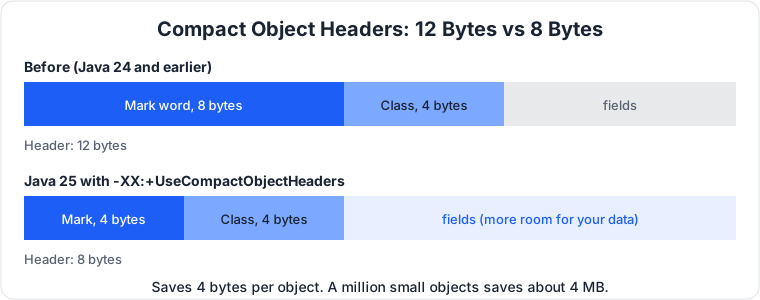
Every object in Java has a header, a small block of metadata stored before the object's fields. The header tells the runtime what class the object belongs to, and it holds bookkeeping bits for locking and garbage collection. Before Java 25, that header was 12 bytes on a 64-bit JVM: 8 bytes for the mark word, and 4 bytes for the class pointer.
Java 25 can compress that header to 8 bytes: 4 bytes for the mark word, and 4 bytes for the class pointer. The feature is called compact object headers, and it is opt-in. You turn it on with a flag.
public class ManyObjects {
    static class Item {
        int id;
        String label;

        Item(int id, String label) {
            this.id = id;
            this.label = label;
        }
    }

    public static void main(String[] args) {
        Item[] items = new Item[1_000_000];
        for (int i = 0; i < items.length; i++) {
            items[i] = new Item(i, "item-" + i);
        }
        IO.println("Created " + items.length + " objects.");
        IO.println("Press Enter to exit.");
        IO.readln();
    }
}
Run it with the flag.
java -XX:+UseCompactObjectHeaders ManyObjects.java
That is the whole change. There is no code to write. You pass a flag, and the JVM uses the smaller header.
Think of it like a warehouse full of small boxes. Every box has a label on it. If you make the label smaller, each box takes up less shelf space. One box does not matter. A million boxes do. Saving 4 bytes per object means a million objects save about 4 megabytes, just from the header.
When to use it: applications that create many small objects. That is most server applications, and especially anything that holds a large in-memory cache, a graph, or a collection of small records. It also helps in containers, where memory is limited and you pay for what you use.
What to watch out for: it is opt-in in Java 25, so you must pass the flag. Measure before and after with your own workload, because the benefit depends on how many objects you have and how small they are. If your objects are large, the header is a small fraction of the total, and the saving is small. If your objects are small, the saving is large. As always, measure, do not guess.
Generational Shenandoah (JEP 521)
A garbage collector is the part of the JVM that finds objects you no longer use and reclaims their memory. Shenandoah is one of the collectors the JDK ships. It is designed for low pause times, which means your application stops as little as possible while the collector works. That matters for services that must respond quickly.
Shenandoah now has a generational mode, and in Java 25 that mode is a production feature. Generational means the collector treats young objects and old objects differently. Most objects die young. They are created, used briefly, and then thrown away. A small number live a long time. A generational collector takes advantage of that. It collects the young objects often and cheaply, and it collects the old objects rarely.
Here is a small program that creates garbage steadily, so you can watch the collector work.
public class GcDemo {
    public static void main(String[] args) throws Exception {
        long end = System.currentTimeMillis() + 30_000;
        while (System.currentTimeMillis() < end) {
            new byte[512 * 1024];
            Thread.sleep(5);
        }
        IO.println("Done.");
    }
}
Run it with Shenandoah in generational mode, and ask the JVM to log garbage collection activity.
java -XX:+UseShenandoahGC -XX:ShenandoahGCMode=generational -Xlog:gc GcDemo.java
The -Xlog:gc flag prints a line every time the collector runs. You will see the young generation being collected often, and the old generation rarely. That is the generational split doing its job.
When to use it: services where low pause times matter and you have a lot of short-lived objects. That is a common shape for web services, APIs, and event processors. If you are already using Shenandoah, generational mode is the one to use now. If you are using G1, the default collector, you do not need to switch. G1 is also generational and is a good default.
What to watch out for: do not switch collectors because a blog post told you to. Run your own workload, look at pause times and throughput, and pick the collector that fits. A collector is a trade-off between pause time, throughput, and memory. There is no single best one.
Ahead-of-time compilation, in one step (JEP 514 and JEP 515)
When a Java program starts, the JVM has to load classes, verify them, and compile the hot methods just in time. That warm-up takes time. For a long-running server, it does not matter. For a short-lived process, or a container that starts and stops often, it does.
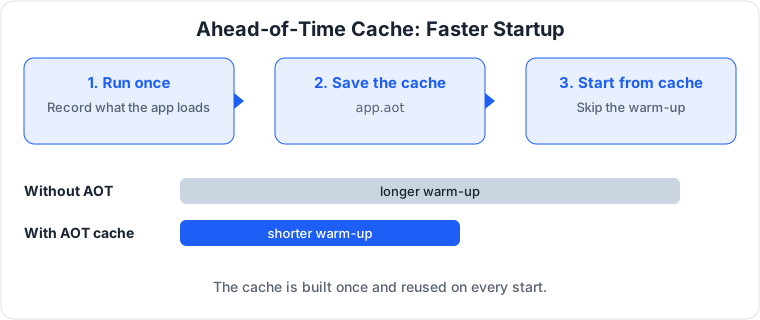
Ahead-of-time, or AOT, compilation helps by doing some of that work in advance. You run the application once, the JVM records which classes were loaded and which methods were used, and it saves that information in a cache file. The next time the application starts, the JVM loads the cache instead of doing the work again. Startup is faster.
Before Java 25, creating that cache took several steps and several commands. Java 25 makes it one step. You run the application with a flag that says where to write the cache.
public class App {
    public static void main(String[] args) {
        long total = 0;
        for (int i = 0; i < 10_000_000; i++) {
            total += i;
        }
        IO.println("Total: " + total);
    }
}
Create the cache with one command.
java -XX:AOTCacheOutput=app.aot App.java
Then run with the cache.
java -XX:AOTCache=app.aot App.java
That is all there is to it. The first command runs the application and writes the cache. The second command runs it again, loading from the cache. Java 25 also stores method profiling data in the same cache, so the JVM spends less time warming up the just-in-time compiler. That is the second feature, ahead-of-time method profiling. You do not need a separate flag for it. It is part of the same cache.
When to use it: containerized services that start often, serverless functions, command-line tools, and anything where startup time matters. If your service runs for hours, the warm-up is a small fraction of its life, and AOT will not change much. If your service starts and stops every few minutes, it will.
What to watch out for: the cache is tied to the exact application and the exact JDK. If you change the code or upgrade the JDK, you must create a new cache. Build it as part of your container image build, not at runtime. Measure startup time with and without the cache on your real application, not a ten-line demo, where there is almost nothing to load.
Better flight recording (JEP 518 and JEP 520)
Java Flight Recorder, or JFR, is a profiling tool built into the JDK. It records what your application is doing: which methods run, how much CPU they use, how memory is allocated, when threads block. You can record while the application runs in production, with very low overhead, and look at the recording later.
Java 25 improves JFR in two ways. Cooperative sampling gives you CPU-time profiling that is more accurate and cheaper. Method timing and tracing gives you finer detail on how long methods take and how they are called.
Here is how you start a recording. Use the same small program from the AOT section, or any program you want to profile.
java -XX:StartFlightRecording:filename=app.jfr,duration=60s,settings=profile App.java
That records for 60 seconds with the profile settings and writes the result to app.jfr. To look at a summary, use the jfr tool.
jfr summary app.jfr
For the full picture, open app.jfr in JDK Mission Control, which is a free desktop tool that comes with the JDK. You will see the CPU-time data and the method timing data alongside the events you already know.
When to use it: any time you need to understand what a production service is actually doing, instead of guessing. A slow endpoint, a memory leak, a thread that blocks. Start a recording, reproduce the problem, and read the data.
What to watch out for: profiling adds a small overhead. The profile settings are a good balance, but do not record everything at the finest detail on a busy production system unless you need to.
The removal: 32-bit x86 is gone (JEP 503)
Java 25 removes the 32-bit x86 port. That means the JDK no longer supports 32-bit x86 systems. If you are running on a 64-bit machine, which almost everyone is, nothing changes for you. If you still have a 32-bit x86 system, you cannot run Java 25 on it. You will need to stay on an older version or move to 64-bit hardware.
This is the kind of removal that sounds bigger than it is. The 32-bit x86 port was rarely used, and keeping it meant maintaining and testing code that almost nobody ran. Removing it lets the JDK team spend that effort elsewhere. For most developers, the only thing to do is nothing.
Still preview, so do not build on these yet
Not everything in Java 25 is final. Four features are still in preview, and one is still in an incubator. They are worth knowing about, but do not use them in production code. Each one below has a short example you can run. Every example needs --enable-preview, because preview and incubator code will not compile or run without it.
Primitive types in patterns (JEP 507, third preview)
Pattern matching used to work only on objects. Now it works on primitive types like int and long too, in both instanceof and switch. Think of it as the same pattern matching you already know, extended to plain numbers.
// Run with: java --enable-preview Main.java
static String describe(int value) {
    return switch (value) {
        case 0 -> "zero";
        case int i when i > 0 -> "positive " + i;
        case int i -> "negative " + i;
    };
}

void main() {
    IO.println(describe(0));    // zero
    IO.println(describe(7));    // positive 7
    IO.println(describe(-3));   // negative -3
}
The case int i line is a pattern that binds any int to the name i. The when i > 0 guard narrows it to positive numbers. When to use it: when you are switching on a number and want the same readable pattern style you use for objects. Watch out: this is a preview, so the syntax can still change.
Structured concurrency (JEP 505, fifth preview)
Structured concurrency treats a group of related tasks as a single unit. You start them together, wait for them all, and if one fails, the rest are cancelled. Think of it as a team that starts together and finishes together, instead of threads you launch and hope for the best.
// Run with: java --enable-preview Main.java
import java.util.concurrent.StructuredTaskScope;

void main() throws Exception {
    try (var scope = new StructuredTaskScope.ShutdownOnFailure()) {
        var hello = scope.fork(() -> "hello");
        var world = scope.fork(() -> "world");
        scope.join().throwIfFailed();
        IO.println(hello.get() + " " + world.get());
    }
}
scope.fork() starts a subtask and gives you a handle to its result. scope.join() waits until every subtask is done. throwIfFailed() throws if any subtask failed, and because this is ShutdownOnFailure, a failure cancels the rest. When to use it: when you fan out to several services or computations and need all of them before you can answer. Watch out: this is a preview, so the API can still change.
Stable values (JEP 502, preview)
A stable value is a holder you set exactly once, the first time you need it, and then it behaves like a constant the JVM can optimize. Think of it as a final field that you are allowed to fill in late, on first use, instead of at startup.
// Run with: java --enable-preview Main.java
static final StableValue<String> GREETING = StableValue.of();

void main() {
    String first = GREETING.orElseSet(() -> "hello, loaded once");
    IO.println(first);
    String second = GREETING.orElseSet(() -> "this never runs");
    IO.println(second);
}
StableValue.of() makes an empty holder. orElseSet() returns the value if it is already set, or runs the supplier once to set it. The second call returns the cached value and never runs its supplier. It is thread safe, so many threads calling it at once still only run the supplier once. When to use it: for an expensive object you only want to create on first use, like a configuration or a connection, without writing double-checked locking by hand. Watch out: this is a preview, so the API can still change.
PEM encodings of cryptographic objects (JEP 470, preview)
PEM is the text format for keys and certificates, the one with -----BEGIN PUBLIC KEY----- lines that OpenSSL and most key files use. Before Java 25 you had to strip those header lines and call Base64 and KeyFactory yourself. Now there is a standard encoder and decoder that do it in one call.
// Run with: java --enable-preview Main.java
import java.security.KeyPair;
import java.security.KeyPairGenerator;
import java.security.PublicKey;

void main() throws Exception {
    KeyPair pair = KeyPairGenerator.getInstance("Ed25519").generateKeyPair();
    String pem = PEMEncoder.of().encodeToString(pair.getPublic());
    IO.println(pem);
    PublicKey back = PEMDecoder.of().decode(pem, PublicKey.class);
    IO.println("Same key: " + back.equals(pair.getPublic()));
}
PEMEncoder.of().encodeToString() turns a key into PEM text. PEMDecoder.of().decode() turns PEM text back into a key, and passing PublicKey.class tells it what type to return. When to use it: when you read or write keys, certificates, or certificate revocation lists in PEM format, for example when talking to OpenSSL or storing keys in files. Watch out: this is a preview, so the API can still change.
Vector API (JEP 508, eleventh incubator)
The Vector API lets you write code that uses the CPU's vector instructions directly. Instead of adding numbers one at a time, you add a whole chunk at once in a single instruction, which can speed up numeric work a lot. Think of it as adding a row of numbers in one go instead of one by one. It is still an incubator, not a standard API yet, and it may still change.
// Run with: java --enable-preview --add-modules jdk.incubator.vector Main.java
import jdk.incubator.vector.FloatVector;
import jdk.incubator.vector.VectorSpecies;

static final VectorSpecies<Float> SPECIES = FloatVector.SPECIES_PREFERRED;

void main() {
    int n = SPECIES.length();
    float[] a = new float[n];
    float[] b = new float[n];
    float[] out = new float[n];
    for (int i = 0; i < n; i++) {
        a[i] = i + 1;
        b[i] = (i + 1) * 10;
    }
    FloatVector va = FloatVector.fromArray(SPECIES, a, 0);
    FloatVector vb = FloatVector.fromArray(SPECIES, b, 0);
    va.add(vb).intoArray(out, 0);
    IO.println(java.util.Arrays.toString(out));
}
SPECIES_PREFERRED picks the best vector size for the CPU you are running on. fromArray loads a chunk of the array into a vector, add adds two vectors element by element in one instruction, and intoArray writes the result back. Note the extra flag: incubator code needs --add-modules jdk.incubator.vector as well as --enable-preview. When to use it: for numeric loops over large arrays, like image processing or math, where the same operation runs on many values. Watch out: this is an incubator, so the API can still change a lot, and the speedup depends on the CPU.
The rule is simple. Final means use it. Preview and incubator mean learn it, try it, and wait.
What Java 25 picks up from 22, 23, and 24
Java 25 is not only the features that are new in 25 itself. It also includes everything that became final in Java 22, 23, and 24, the short-term releases between the two LTS versions. If you are upgrading from Java 21, you get all of that too.
Stream gatherers (JEP 485) let you write custom intermediate operations for streams. The Class-File API (JEP 484) gives you a standard way to read and write class files. The Foreign Function and Memory API (JEP 454) lets you call native code and work with off-heap memory safely, without JNI. Unnamed variables and patterns (JEP 456) let you use an underscore for a value you do not need.
Two fixes from that period are worth knowing. Virtual threads no longer pin inside synchronized blocks (JEP 491), which removes the most common footgun from my Java 21 post. And the Security Manager is permanently disabled (JEP 486).
Should you upgrade?
If you are on Java 21, yes, plan the upgrade. Java 25 is the new LTS, supported until September 2030, and it finalizes the features you were probably already previewing. The upgrade is not a rewrite. Most code that runs on Java 21 runs on Java 25 unchanged. The work is in testing, in updating dependencies, and in checking for the few removals and deprecations.
Start by running your test suite on Java 25 in a branch. Fix what breaks. Then turn on the new features where they help: scoped values where you use ThreadLocal with virtual threads, compact object headers if you hold many small objects in memory, the AOT cache if your containers start slowly. You do not have to adopt everything at once. Pick the one or two that solve a problem you actually have.
If you are on Java 17 or older, the jump is bigger, and you should read the Java 21 changes too. If you are starting a new project, use Java 25.
Conclusion
Java 25 is not a dramatic release. It is a careful one. It takes the ideas that were previewed over the last two years and makes them permanent. A simpler way to write a small program. A safer way to pass data between threads. A standard way to derive a key. Less memory per object. Faster startup. Better profiling. And it removes the things that no longer earn their keep.
That is what a good LTS looks like. It does not ask you to rewrite your code. It gives you better tools for the code you are already writing, and it promises to support them for years.
If you take one thing from this post, take this: learn scoped values. Virtual threads changed how we write concurrent code, and scoped values are the other half of that change.
Try the examples above. Run them. Change them. Break them. That is how you learn a release, and Java 25 rewards the effort.

Principal Engineer, Payments & Fraud Platforms at US Mobile, in New York, USA. I write about the systems I run: fraud decisioning, payment platforms, edge security, and production AI.